
Rain delays and rainouts: how to reschedule a youth tournament fast
Lightning in the area at 12:40. Fields cleared. Forty games left on the weekend, coaches at your table, and a few hundred parents refreshing their phones. What happens in the next ten minutes decides whether this is a delay or a mess.
Here's a weather-day plan that works, and how GamedayHawk turns the rescheduling part into a few clicks.
Why weather days fall apart
The weather isn't the hard part. The communication is. On most weather days you'll see some mix of:
- Games moved one at a time while the clock runs
- A phone tree, a group text and a social post that all say slightly different things
- Coaches told before parents, or the other way around
- A family at the wrong field because their screenshot is from this morning
Delay games: push the afternoon back in one step
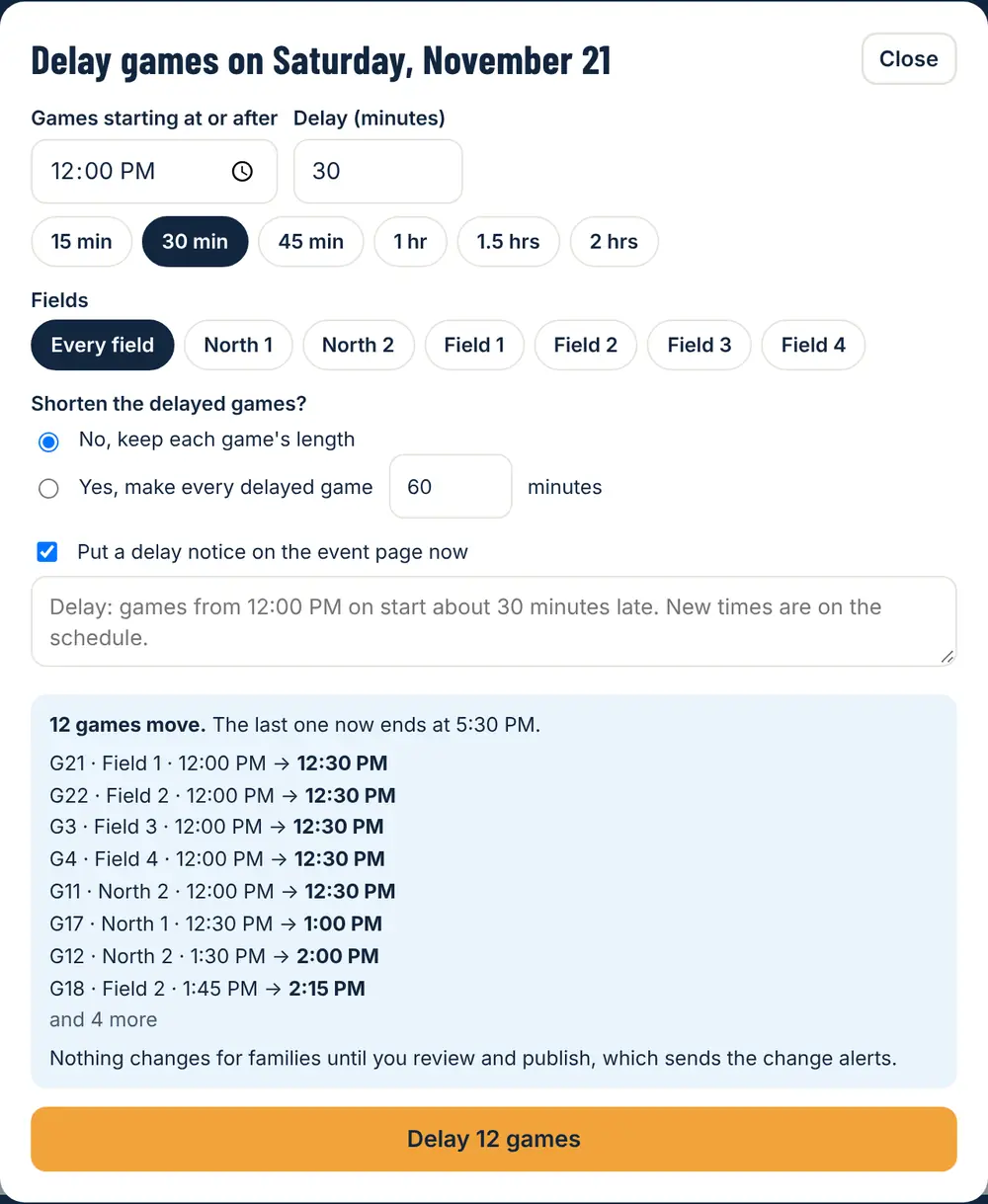
On the schedule board, each day has a Delay games button. Pick a start time, choose how long (15 minutes up to 2 hours, or any number), and choose every field or just the ones that are wet. You can also shorten the delayed games to win back time at the end of the day.
Before you commit, GamedayHawk shows exactly what will happen: how many games move, each one's old and new time, and when the last game now ends. If that end time doesn't work, change the numbers and look again.
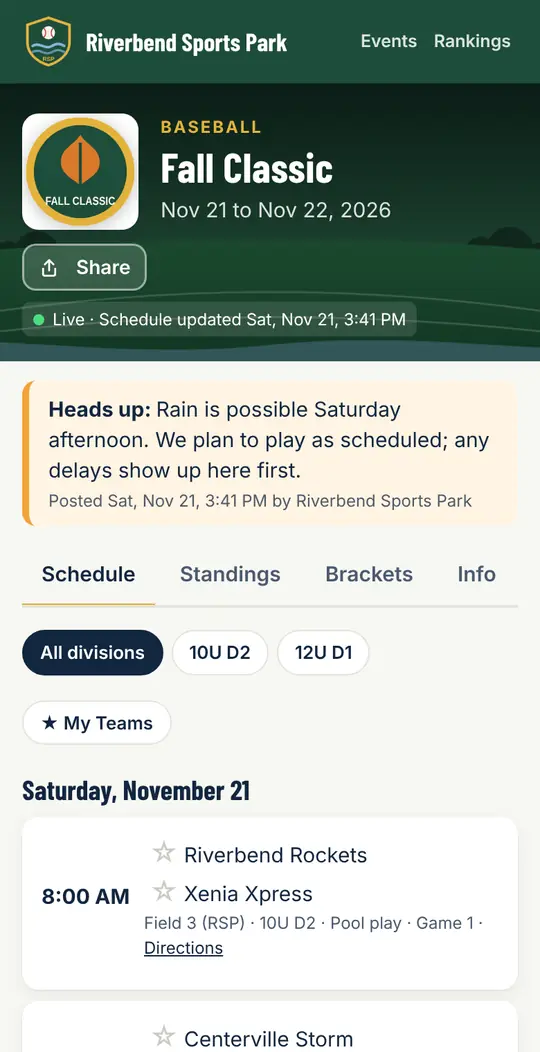
Tick Put a delay notice on the event page now and a short notice goes to the top of the public page, so families see it the moment they look.
Nothing changes for families until you publish
A delay is a draft like any other change. Look over the board, move anything by hand that needs it, then press Review and publish. That's when the public schedule updates, moved games are marked Changed, and the coaches and families following each affected team get the new times by email, and by text if they opted in.
One decision, one update, and everybody hears the same thing.
Rainouts in a league season
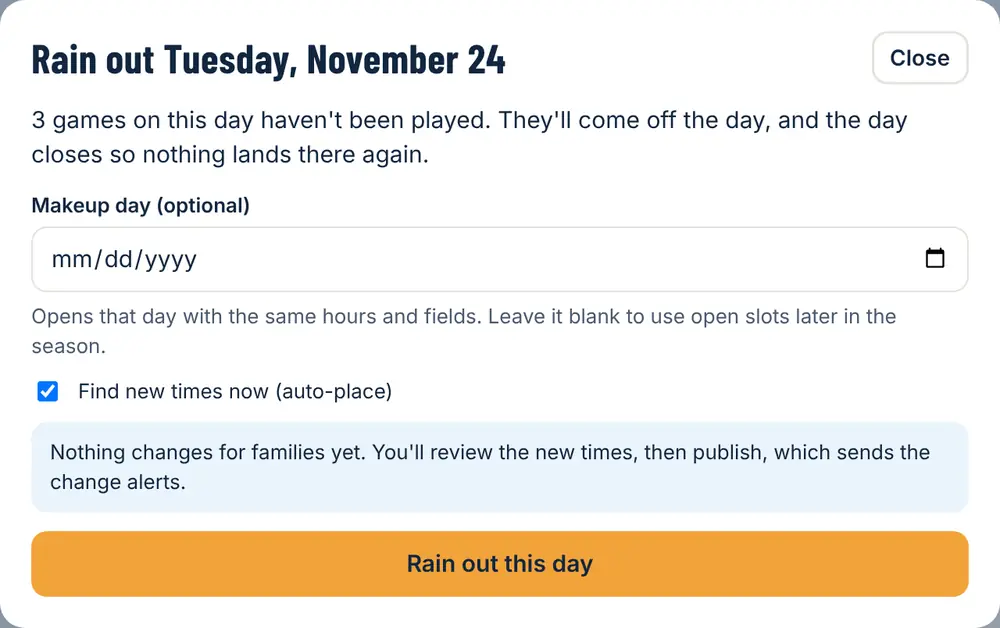
Leagues lose whole nights, not hours. On a league's board, Rain out this day (or Call off this day for court sports) takes the unplayed games off that night and closes it so nothing lands there by accident. Pick an optional makeup day and it opens with the same hours and fields. Leave it blank and the games go to open slots later in the season.
Keep Find new times now checked and Auto-place finds new homes for the games right away, following the league's rules, like one game per team a night and the weekly limit. As always, families see nothing until you review and publish.
Tell everyone once, in the right words
For anything beyond the schedule itself, use Announcements. Pick who gets it (everyone, coaches only, families only, or one division), write the note, and send it by email, text or both. Add a banner to the event page at the same time, and take it down when the sun's out.
A weather-day checklist for directors
- Set your lightning and rain rules before the event, and put them on the event's Info page.
- When play stops, post a banner right away with the time of your next update.
- Decide the delay once. Use the preview to check the day's last game still fits.
- Publish once, so every coach and family gets the same message.
- Check the Changed games on the public page from your own phone.
- Update the banner when play resumes, then clear it.
For coaches and parents
On a weather day, the event page is the source of truth. Follow your team by email for change alerts, or star it on the page and check back. Calendar apps update on their own but only every few hours, so on game day trust the page. If you're new to the event page, here's what parents see and how to follow a team.
Questions
How do I delay every game on a tournament day at once?
Use Delay games on that day of the schedule board. Pick the start time, the delay and the fields, preview the new times, then review and publish.
Do families get notified automatically?
When you publish, coaches and families following the affected teams get the new times by email, and by text if they opted in. Moved games are marked Changed on the public page.
Can I post a weather notice on the event page?
Yes. The delay window can post a notice for you, and Announcements lets you add or remove a banner and send a message by email, text or both.
How do league rainouts work?
Rain out the night from the board. Its unplayed games come off, an optional makeup day opens with the same hours and fields, and Auto-place can find new times. Nothing goes public until you publish.